
Virtual Reality based painting Simulator
SPECIFICATION
TECHNICAL SPECIFICATIONS
-
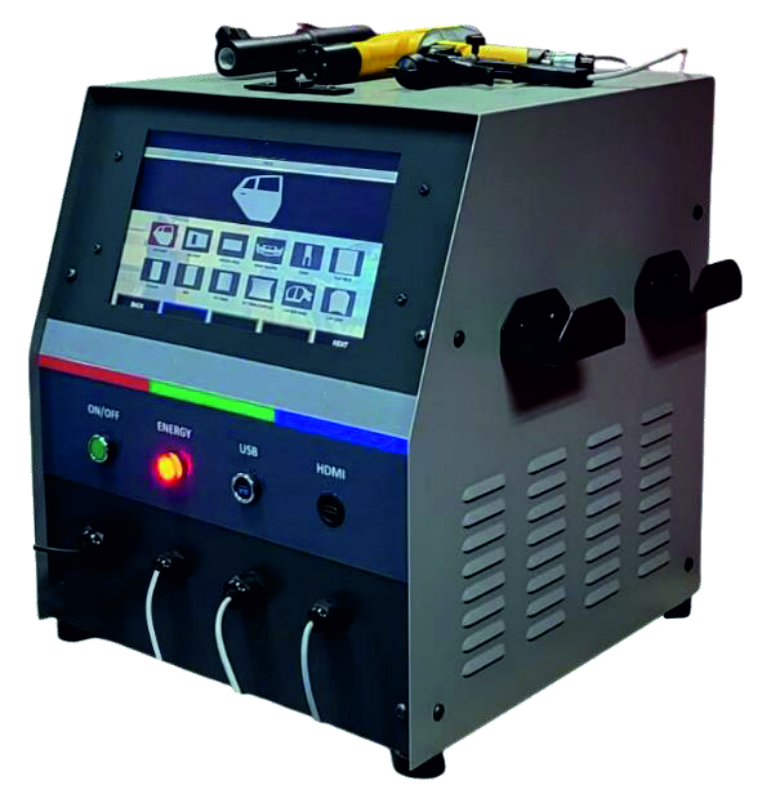
The paint simulator has VR feature.
-
It has fast installation and a user-friendly interface with touch screen and can be activated with a single button.
-
The simulator can work in any environment where there is an electrical connection (classroom, workshop, etc.).
-
It has HDMI output for connection to TV or projector.
-
It works with 110–230 V, 50–60 Hz.
-
Work can be done on the following work pieces:
a. Flat
b. Curved
c. Complex parts -
The simulation has a high realism.
-
At least 12 work pieces can be worked with (Vehicle door, Vehicle roof, Welded part, Front bumper, Chair, Flat part, Cylinder, Box, Curved panel, Curved panel (Complex), Vehicle side panel, Vehicle hood).
-
The color scale includes commercially available colors and is available in gloss, semi-gloss, and matt.
-
Visual aid activation panel is available.
-
Real-time scoring is available.
-
The following defects can be displayed:
a. Dripping
b. Orange peel defect
c. Dry spray -
The work can then be seen again in 3D and parameters such as paint angle and distance are shown in different colors, and the details of the work can be examined.
-
The work done by the students can be followed step by step and reported.
-
Movement can be tracked (angle, distance, speed).
-
Errors in painting can be mapped and the mistakes made can be clearly seen.
-
There are screens that adjustments/pre-settings are done on the interface where the techniques and materials to be used in painting such as;
• name entry screen,
• data saving screen to USB memory,
• application update screen,
• paint technique selection screen,
• paint material selection screen,
• paint color selection screen,
• paint gun and specification screen,
• area selection screen,
• equipment settings (part offsets, air pressure, tip size and other configurations) screens. -
All entered data is saved in the local database of the simulator using the MYSQL database system by using the middle layer to be developed with the PHP software language.
-
The simulator includes abrasive blasting and coating modules as well as the painting module.
-
The simulator has Faraday mode feature.
-
Spray angle can be adjusted.
-
For evaluation, the following parameters are used:
• the angles the student makes while holding the paint gun in virtual reality,
• the distance of the gun to the material,
• the progress speed,
• the parameter values selected before starting painting. -
There is a mapping screen where the user can examine the part he/she is painting. On this screen, the paint on the part is mapped with blue, red and green colors. By mapping the thickness of the paint in that location according to the progress vector, the entire part can be visually analyzed.
-
All data can be recorded on a single platform to track real-time assessment of students.
-
Manufacturer can be reached for technical support requirements.
-
User data for up to 20 users can be compared graphically.
-
Spray painting gun, powder coating gun, sandblasting gun are similar in structure and weight to the real ones.
-
All analysis data can be saved as PDF.
-
With the Teacher System that can be installed on an external computer, the device can be connected remotely and the simulation can be started from the Teacher system.
Enquiry Form
Related Product







Tesca specialize in doing turnkey projects that is fully operable when it is handed over to the project authority. Starting from inception to application training, Tesca provides the services as ONE source solution. Working side by side with government authorities and people across the World, we help countries to perform better. We support countries grow their economies, strengthen their education and health systems and improve financial management. We do this by providing consultancy & training in environment safety, education, health strengthening.
Category
Useful Links
Contact Us
International Sales:
 91-9829132777
91-9413330765
India Sales:
91-9588842361
2026 © All Rights Reserved.